- Sign in to your Admin Portal.
- If you have multiple locations, select the location to update from your dashboard.
- In the Group dashboard, select Auto Attendant under Group Services.
- Select the Auto Attendant you want to modify.
- Depending on the Auto Attendant type, select either After-Hours Menu Audio or Holiday Hours Menu Audio.
- Click on the gear symbol in the upper-right corner of that box.
- Choose Personal from the drop-down menu of Announcement Type and select either an existing announcement or create a new one.
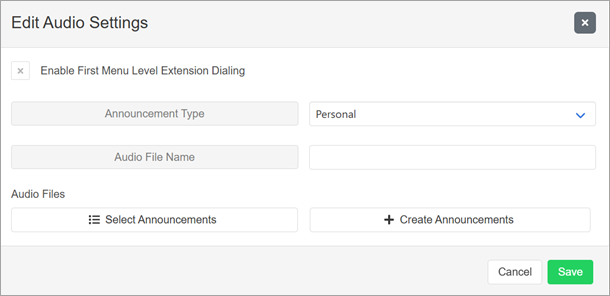
- Create Announcements will allow you to upload a new announcement audio file. It must be saved as a .wav file with the following attributes: μ-Law, 8000 Hz, 64 kbps, mono.
- Click Save.
- The new file should be applied.
- Click Save again.
See also:
Update your Voicemail
Record an Auto Attendant Greeting from your VoIP phone
Update your Auto Attendant Schedule for Holiday Hours
Update your Voicemail
Record an Auto Attendant Greeting from your VoIP phone
Update your Auto Attendant Schedule for Holiday Hours
If you've migrated to C Spire Voice with Webex, see instructions here:
Webex Customers: Record an Auto Attendant Greeting from your VoIP phone
Webex Customers: Upload an Auto Attendant Greeting in Control Hub
Webex Customers: Update your Auto Attendant Schedule for Holiday Hours
Webex Customers: Record an Auto Attendant Greeting from your VoIP phone
Webex Customers: Upload an Auto Attendant Greeting in Control Hub
Webex Customers: Update your Auto Attendant Schedule for Holiday Hours
