Wireless Support
How to view your usage logs for calls, text messages and data sessions
One of the many things you can do through your online account is view a log of your calls, text messages, and data sessions. Here’s the type of information you can access: Call Detail
- Incoming and outgoing calls for the current billing cycle and the four previous billing cycles
- Call date and time
- Length of call
- Charge for call (if any)
- Incoming and outgoing text messages for the current billing cycle and the three previous billing cycles
- Message date and time
- Type of message (text or multimedia)
- Charge for message (if any) We do not provide the content of these messages.
- Date and time of the data session for the current billing cycle and the three previous billing cycles
- Amount of data used in megabytes
- Charge for data session (if any)
- Only the primary user on the account can view call, text and data usage logs. (The primary account holder is usually the person authorized to pay the bill.)
- You must have already entered your CPNI PIN for access to your billing and usage information. If you're able to view a PDF copy of your bill, you're all set. If you see a message that you need to enter your CPNI PIN to view the information, click the "Need CPNI PIN?" link and it will be sent to you by mail.
- The call, text and data usage detail information is not real time. There could be a delay of about 24 hours before usage is displayed.
1
To start, sign in to your online account. If you don’t have an online account yet, learn how to register for a My Account profile.
2
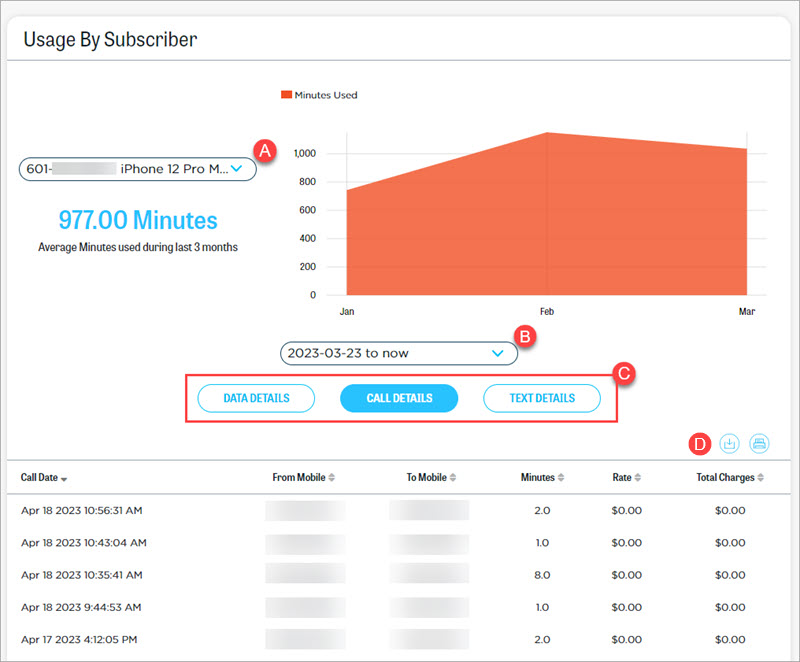
Select Usage from the side navigation and scroll down to Usage By Subscriber.