Wireless Support
How to add the Adult Content Filter to your account
Block your kids from accessing mature Internet content on their devices through the Adult Content Filter.
How it works: When you add the filter to a mobile number on your account, that number will be unable to access adult content while on the C Spire Wireless Network. You can also block content from being accessible through your C Spire wireless hotspot. The filter can only be used on C Spire's network, meaning it won't work through Wi-Fi.
Signing up: There are several ways to sign up for the Adult Content Filter:
Text BLOCK to 7372. If you're the account holder, doing this will automatically add the feature to all of the mobile numbers on your account. For all other users, the feature will be added only to the mobile number from which the text was sent.
After receiving the confirmation message, turn affected devices off and then back on to ensure the latest settings have downloaded. It can take up to 24 hours for the feature to become active on all devices, once added.
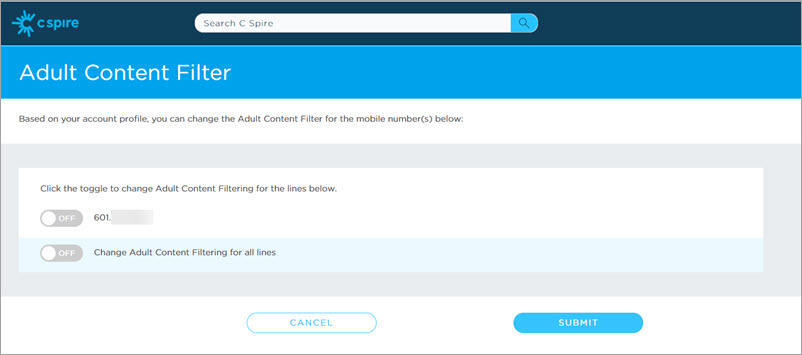
Primary account users can also add the filter to specific mobile numbers on their account by following the steps below.
1
Sign in to your account.
If you don’t have an online account yet, learn how to register for a My Account profile.
3
Follow the on-screen prompts to complete the process.
You'll receive a confirmation message. Afterward, turn the relevant devices off and then back on to ensure the latest settings have downloaded. It can take up to 24 hours for the feature to become active on all devices, once added.
To turn off the Adult Content Filter
- Sign in to your account.
- Uncheck the mobile numbers that should no longer have the Adult Content Filter.
- Click Submit.
- Click Save Features.
- After receiving the confirmation message, turn affected devices off and then back on to ensure the latest settings have downloaded.
