Activating Standalone Cellular Service on Your Apple Watch Series 4 and above (GPS + Cellular)
Activating Standalone Cellular Service on Your Apple Watch Series 4 and above (GPS + Cellular)
To activate your Watch's cellular service, you'll need an eligible iPhone on your account. Through Family Setup from Apple, you can use your iPhone to set up a Watch for a family member, which can then be used with its own phone number and its own included data even without the iPhone nearby. The Standalone Wearable plans let you connect your family member’s watch to C Spire’s cellular network with its own mobile service plan to make or receive calls, send or receive messages, use Siri, use Maps, and more.
Confirm these settings on your iPhone before you begin:
Wi-Fi is on - Settings > Wi-Fi > Confirm Wi-Fi on
Bluetooth is on - Settings > Bluetooth > Confirm Bluetooth is on
LTE is on - Settings > Cellular > Cellular Data > Cellular Data is on > Cellular Data Options > Enable LTE > Confirm LTE is on
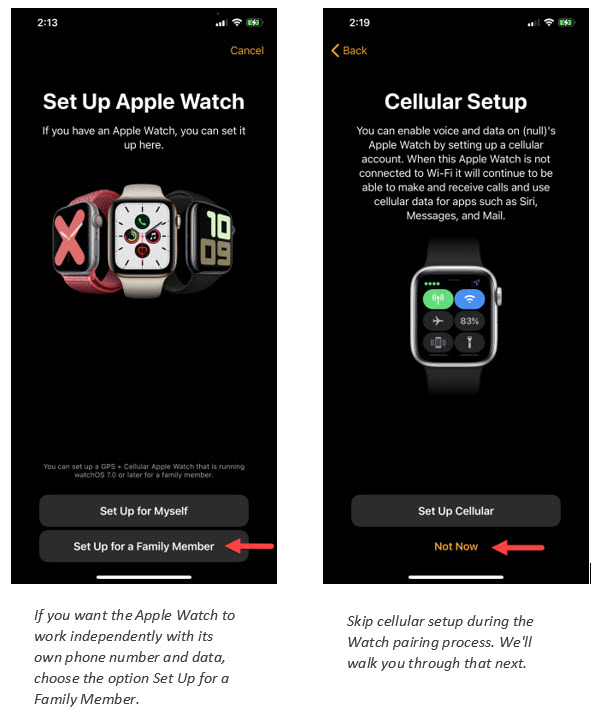
To get started, pair your Apple Watch with your iPhone. This must be done prior to activating your Watch's cellular service. When pairing, choose the option on your Watch to Set Up for a Family Member so the Watch will have its own phone number and its own included data. Be sure to skip the option to set up cellular service at this time. We provide instructions for doing that below.
If you receive the message "Carrier does not currently support Apple Watch," please update the Carrier Setting on your iPhone. Tap Settings > General > About. If an update is available, you'll see an option to update your Carrier Setting. Your iPhone needs iOS 11 or newer and Carrier Setting 32.1 or newer.