Wireless Support
Transferring your device and service to someone else
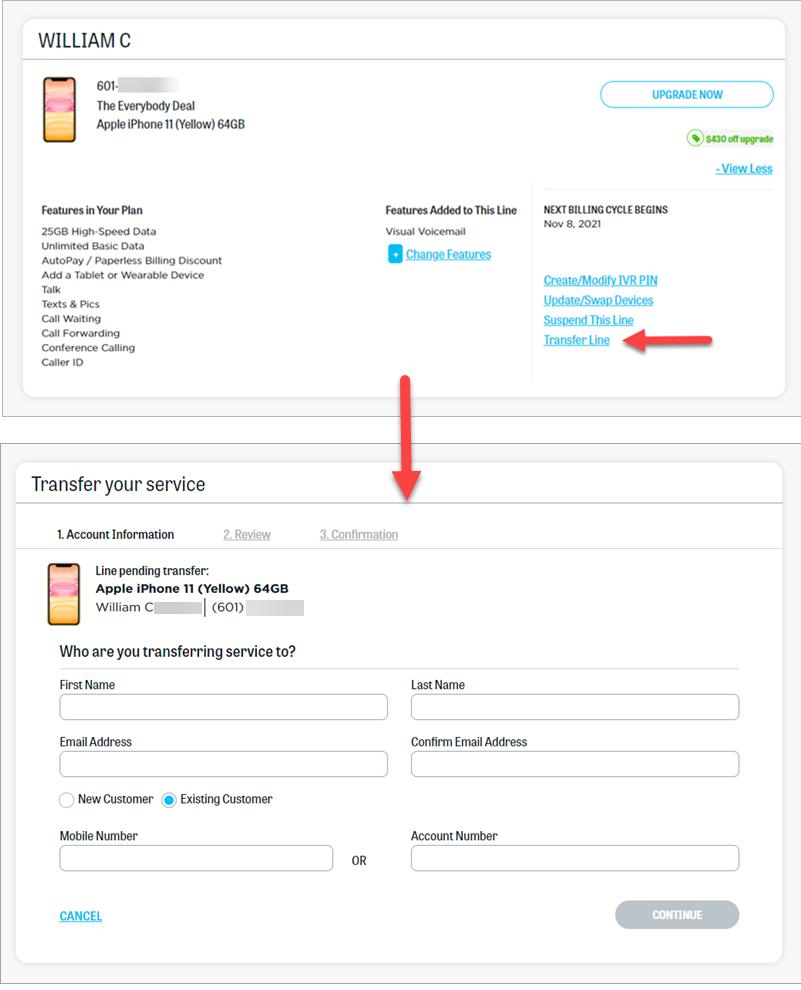
You can transfer an active device on your account to someone else through your online account. Service can be transferred to an existing customer or a new customer. The transfer request must be accepted by the receiving party and both of you must electronically sign a transfer agreement before the transfer is considered completed.
By accepting the device, the person receiving it agrees to accept the device, service, and associated phone number.
Steps for submitting a transfer request and additional details about the process are listed below.
1
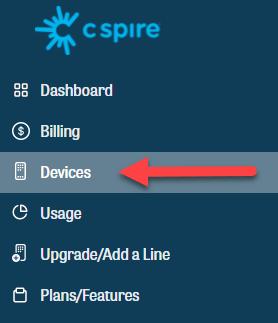
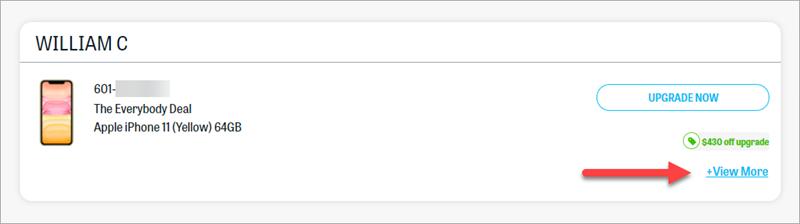
Sign in to your online account.
5
Review the transfer agreement and accept it to submit your transfer request.
6
After submitting the transfer request, the person you want to transfer your device and service to will receive an email and will need to accept the transfer. The process will continue via email and in your online account and will be complete when both parties have electronically signed the transfer agreement.
The transfer request will be canceled automatically if not completed within 30 days.
Here are some other details to note when transferring or accepting a subscription:
- If there is an existing balance on the device you want to transfer, in most instances, that balance will be the responsibility of the person receiving the device. By accepting the transfer, the new owner accepts responsibility for paying the remaining balance of the device.
- If the device being transferred currently has a promotional offer contract, the new owner will also inherit the contract terms.
- If a non-customer accepts the transfer request, a soft credit inquiry will be performed when they establish service. This inquiry will not affect their credit score.
- The transfer request can be canceled at any time by the person who submitted the request.
- The Notifications section of your account dashboard will display the current status of the transfer. You can also find this information in the Devices section of your account.
- Once completed by both parties, the transfer agreement can be found in the View More section of the transferred device in the new owner's online account.
