×
Wireless Support
C Spire Wireless Support
How to reset your account password on desktop and mobile
How to reset your account password on desktop and mobile
If you've forgotten your C Spire account password or username, you can recover them by following the steps below.
1
Go to the C Spire
account sign-in page
.
2
Under the sign-in info, click on
Forgot your Username or Password?
.
3
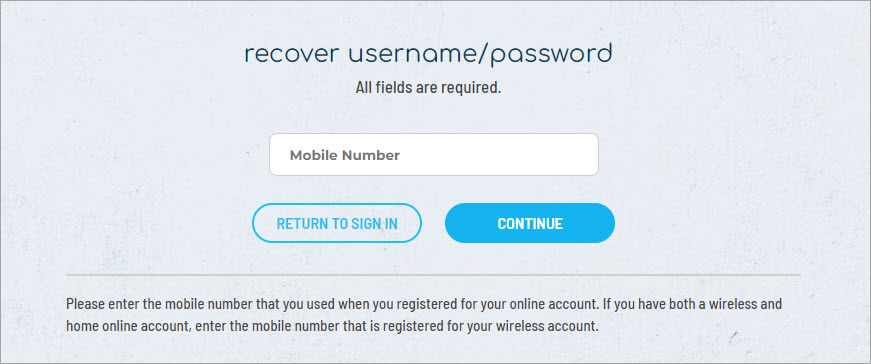
Enter the mobile number that you used when you registered for your online account.
4
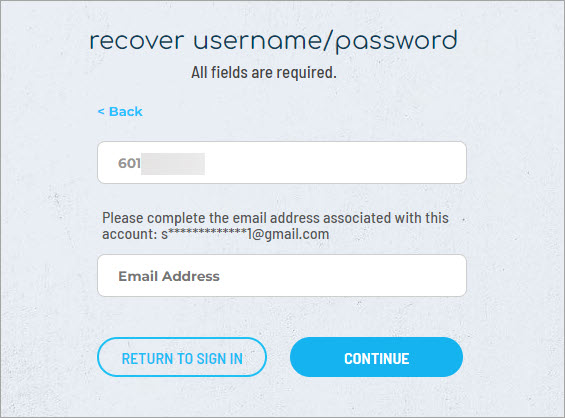
Next, enter the email address associated with your account.
5
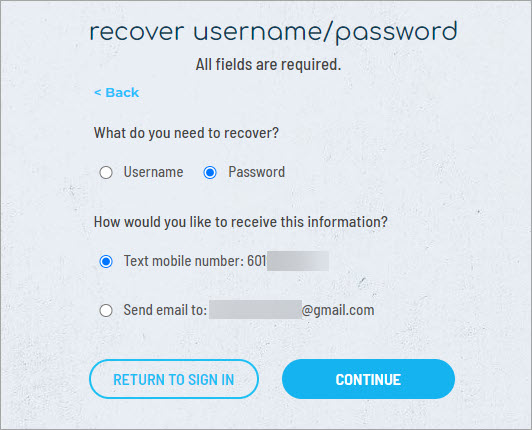
Indicate which you would like to recover—your username or password—and how you would like to receive the information—by text message or email.
6
After submitting your request, you'll see a message stating that the information you requested is being delivered by the method you selected.
7
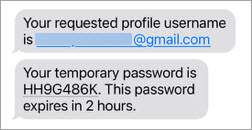
Here's an example of a text message containing the requested account sign-in information.
8
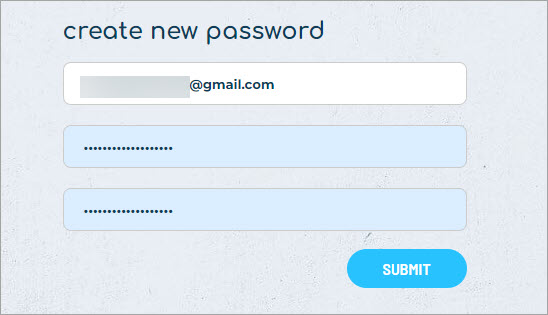
Sign in with the temporary password. Then, you'll be prompted to create a new password.
9
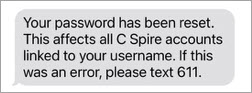
Any time, you change your account password, you'll receive a text message or email confirmation.