×
Previous
Next
Holiday Bundle
Wireless Support
C Spire Wireless Support
How to check your C Spire order status online
How to check your C Spire order status online
Access your order status in your online account or with your order number. See below.
1
Sign in to your online account
and choose
Order History
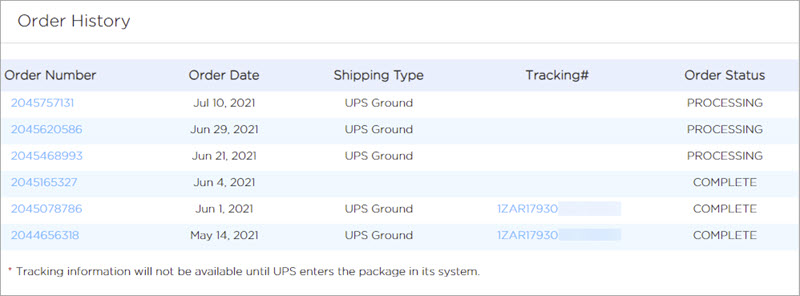
from the side navigation of your dashboard. Here, you’ll see your most recent order numbers along with the current status of each. If the tracking information is available, you’ll see it on this Order History overview. Click on the order number in question for more details.
2
If you don’t have an online account,
check your order status here
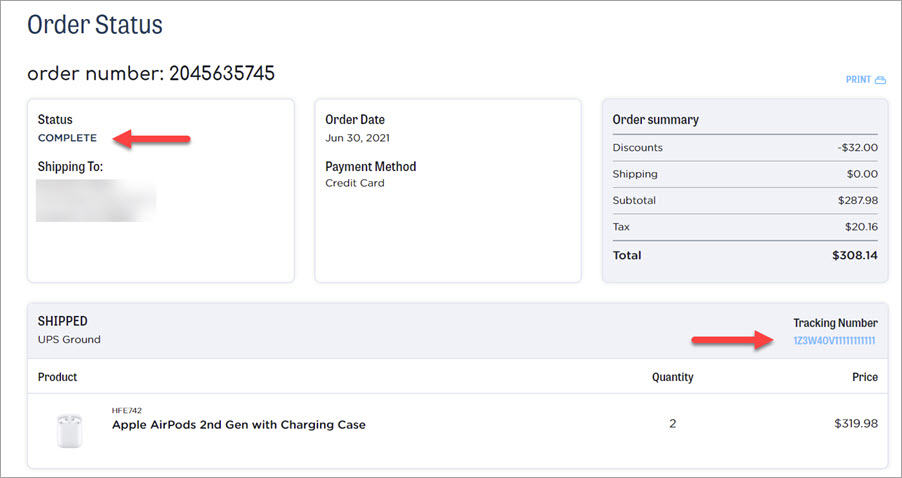
. You'll need the 10-digit order number and the billing ZIP code. You can find this information in your order confirmation email. After accessing your order, you’ll see the status and tracking information, if available yet.