Confirm the lock status of your device
Android Devices: Contact your current carrier to find out if your device is locked or unlocked. See carrier info below.
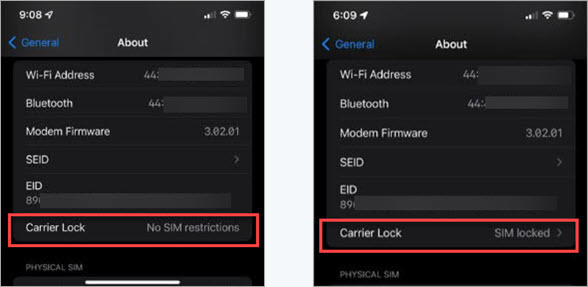
iOS Devices: Go to Settings > General > About > Scroll to the Carrier Lock setting. "No SIM restrictions" means the device is unlocked. "SIM Locked" means that your device is locked to its current carrier.
Contact customer support for your previous carrier to unlock your device.
- Verizon: Device Unlocking Policy and Device Locking FAQs
- AT&T: Unlock your device
- T-Mobile: Unlock your device
Note: An unlocked device may not work immediately on C Spire's network. Functionality depends on our network, its policies and device management capabilities.
Need a new device?
Shop our Prepaid/C Spire Switch devices or our Postpaid devices.
