Home Services Support
How to set up WiFi security
C Spire Connect WiFi security allows real-time protection against a variety of cyberthreats. Plus, you can control which security features are enabled. C Spire recommends enabling all of the security features to provide the highest level of security for your family members and devices.
1
Tap the Menu button on the main screen.
2
Tap the AI Security™ link.
4
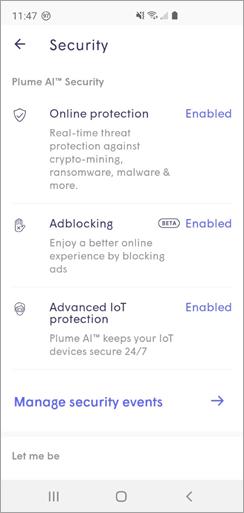
Tap Manage Security Events to see blocked content and threats.
Online Protection activates real-time protection against ransomware, malware, and more.
Advanced IoT Protection™ protects your network and smart-home devices against hackers and cybercriminals.
Adblocking blocks loading of web and video ads.
